That cardboard box in the loft may contain more than fuzzy footage. It may hold a child’s first bike ride, a birthday tea with paper plates, the family dog charging through the frame, or Christmas morning recorded over a slightly wonky episode of The Generation Game. To digitise family VHS tapes is to rescue those gloriously ordinary moments before the tape itself, or the machine needed to play it, finally gives up.
VHS was never designed as an archive format. We treated tapes as endlessly reusable household furniture: labelled in biro, stacked beside the telly, rewound with a satisfying clunk and occasionally rescued when the VCR chewed a ribbon. Yet those cassette mechanisms captured the people, voices and rooms that tend to matter more with every passing year.
Why VHS tapes need attention now
Magnetic videotape deteriorates gradually. The picture can become noisier, colours may bleed, and tracking lines can creep across the screen. In a damp loft, garage or shed, mould can also develop on the tape. Add a tired VCR with worn heads and unreliable belts, and a cassette that played perfectly in 1994 can become surprisingly difficult to watch in 2026.
That does not mean every tape is on the verge of disappearing tomorrow. A well-stored cassette can remain playable for years. The trouble is that deterioration is unpredictable, while working VHS machines are becoming harder to find and repair. The sensible approach is not panic, but priority. Start with the irreplaceable tapes: family events, recordings of relatives who are no longer with us, and the little home-video fragments nobody has watched since the days of wood-effect TV cabinets.
Digitisation does not make the original tape immortal, but it gives you a usable copy that can be backed up, shared and watched without putting further wear on the cassette.
Before you digitise family VHS tapes, sort the cupboard
A quick sort saves a great deal of time later. Gather the tapes in one dry, clean room and read every handwritten spine. Some labels will be wonderfully precise - “Ben’s sports day 1991” - while others will offer the full mystery-box experience: “MISC”, “Telly”, or “DO NOT TAPE OVER”. Keep a simple note of what each cassette appears to contain.
Do not assume the label tells the whole story. Family tapes were regularly recorded over, sometimes partly, and a wedding may be followed by ten minutes of Neighbours or a child’s attempt at presenting their own television programme. Watch enough of each tape to identify the contents, then give the digital file a meaningful name. “Mum and Dad’s anniversary, June 1988” is far more useful than “VHS_004”.
If a cassette smells musty, has visible white or grey residue inside the shell, or looks badly crinkled, do not put it straight into your VCR. Mould can damage both the tape and the player. These are the tapes for a specialist transfer service, particularly if the footage is unique.
Choose between doing it yourself and using a transfer service
There are two sensible routes, and neither is automatically better.
The DIY route
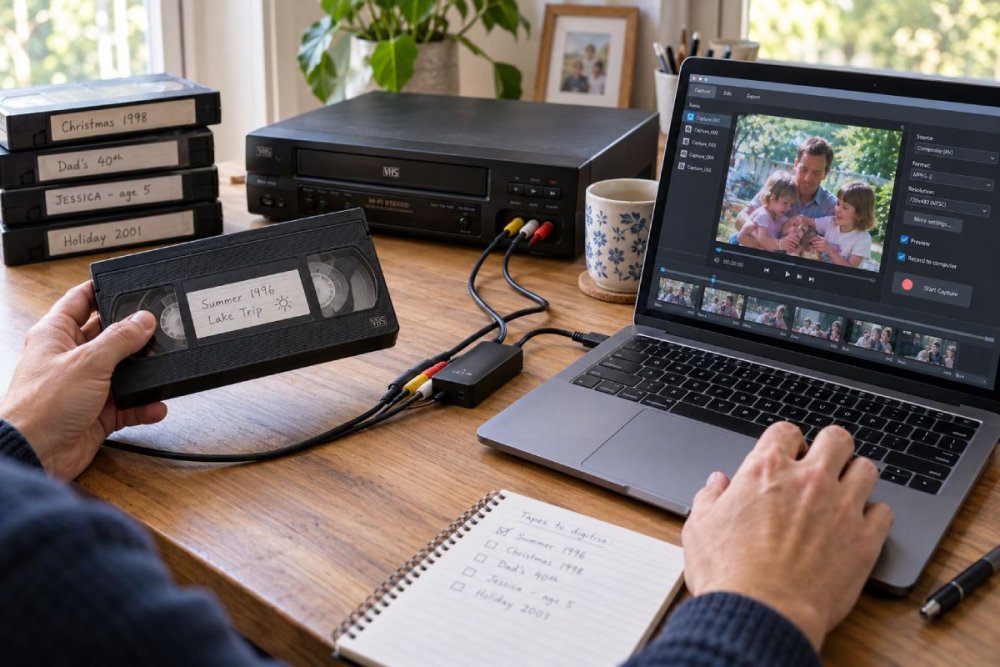
Doing it yourself suits anyone with a working VCR, a modest pile of tapes and the patience for a project. You will need a VHS player, the appropriate AV cables, a USB video-capture device and a computer with enough storage. Many capture devices accept the familiar yellow, red and white phono connections, while some VCRs use a SCART socket and need an adaptor.
The process is pleasantly hands-on. Connect the VCR to the capture device, connect that to the computer, open the supplied or chosen capture software, press play on the VCR and record in real time. A two-hour tape takes two hours to capture. There is no cassette-loading-screen shortcut here.
A decent VCR matters more than fancy software. If possible, use a machine that plays tapes cleanly and has stable tracking. Test it with an unimportant cassette first. If the picture rolls, shows bands of static or repeatedly loses colour, try adjusting tracking if your VCR allows it. Sometimes another machine will produce a noticeably better result.
The professional route
A specialist service is usually the wiser choice for fragile, mouldy or especially precious tapes. It is also useful if you have formats beyond standard VHS, such as VHS-C, Video8, Hi8 or MiniDV, each of which needs the correct playback equipment.
The trade-off is cost and less control over the process. Ask what digital format you will receive, whether basic image correction is included, and whether your original cassettes will be returned. A service cannot create detail that VHS never captured, but it may have better machines and time-base correction equipment to stabilise a wobbly picture.
For a single tape of a lost grandparent chatting at a kitchen table, that can be money well spent.
Capture the footage without chasing perfection
Set your expectations to VHS rather than 4K. Those soft edges, occasional flickers and slightly over-bright colours are part of the format’s character. The aim is a faithful, stable digital copy, not footage that suddenly looks as though it was filmed last week.
Record at the highest sensible quality offered by your capture setup, ideally into a widely supported format such as MP4. Avoid repeatedly converting the same file, as each conversion can reduce quality. If the software offers a choice, a higher bitrate will generally preserve more of the original picture, although it will create a larger file.
Watch the capture as it happens, at least often enough to spot a loose lead, a stopped recording or an unexpected blue screen. It is frustrating to discover that a tape played for 90 minutes while the computer captured only the first five. Keep an eye on audio too. VHS sound can be low, hissy or uneven, but sudden silence usually points to a connection problem.
Resist the temptation to apply heavy filters. Mild brightness, colour and audio adjustments can help, especially with an underexposed living-room recording. Aggressive sharpening and noise reduction often replace analogue softness with strange digital smearing. That familiar home-video glow is preferable to turning everyone into waxwork figures.
Name, organise and back up the new files
The transfer is only half the job. A digital file left on one ageing laptop is simply a VHS tape with fewer chunky buttons.
Use a naming pattern that makes sense at a glance: year-month-day, event, then people or location if helpful. For example, “1992-12-25 Christmas Day - Gran’s House.mp4”. Add short notes where memories are uncertain. A file called “Summer holiday, possibly Skegness, 1987” is still much easier to find than an anonymous numbered clip.
Keep at least three copies in separate places: one on your computer, one on an external hard drive and one in secure cloud storage. If cloud storage is not for you, store the second drive at another trusted home. Hard drives fail, laptops get replaced and family history deserves more protection than a single Downloads folder.
It is also worth making easy-to-watch copies for relatives. A shared folder, USB stick or simple family screening can turn preservation into something warmer than administration. You may finally learn who that uncle was behind the camcorder, why everyone is laughing in the background, or whose bright idea it was to film an entire school nativity from behind somebody’s head.
Keep the originals, even after transfer
Once you have digitised the tapes, do not rush to bin them. Store the originals upright in their cases, in a cool, dry and stable place away from radiators, direct sunlight and damp. A cupboard inside the house is far better than a loft or shed.
The tape remains the original artefact, complete with its handwritten label and the physical evidence of a family’s analogue life. It may also be worth retaining in case future equipment or restoration methods can produce a better transfer. Just do not keep it as the only copy.
Make a pot of tea, choose one cassette you have been meaning to watch for years and begin there. The first capture may include tracking fuzz, shaky camera work and somebody asking where the remote has gone, but that is precisely the point. These are not polished productions. They are the moving, noisy little records of the life we actually lived.